Turn your map pins into a route you can actually walk.
Drop in a Google My Maps export and get Google Maps links back. Past 10 stops, we split the route so Google doesn’t quietly drop the rest.
- Runs in your browser. Your file never leaves your device.
- Over 10 stops? You get linked routes of up to 10 stops each.
- Free, with no account.
.kml files up to 5 MB
- Runs in your browser. Your file never leaves your device.
- Over 10 stops? You get linked routes of up to 10 stops each.
- Free, with no account.
Where do I get a KML file?
From Google My Maps, in four clicks. If your map lives anywhere else, look for an “export to KML” option.
-
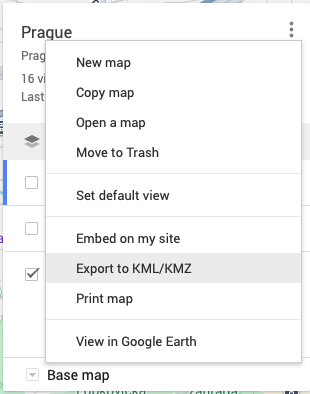
Open your map in Google My Maps and click the three dots next to the map title.
-
Choose Export to KML/KMZ.
-
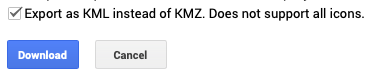
Tick Export as KML instead of KMZ, then click Download.
-
Drop the downloaded file in the box at the top of this page.
Questions people ask
What is a KML file?
KML (Keyhole Markup Language) is a file format for map data. Google My Maps exports your custom map as a KML file that holds your pins, their names and their coordinates. This tool reads those pins and turns them into Google Maps directions links.
What happens with more than 10 stops?
A single Google Maps link holds about 10 stops. For longer routes we split your route into the fewest links that fit and spread the stops evenly. Open them in order: each link starts at the stop where the previous one ended, so the route stays continuous. That shared stop shows up in both links.
Is my file uploaded anywhere?
No. Your browser reads and converts the file on your device. Nothing is sent to a server and nothing is stored.
Why doesn’t Google Maps show my pin names?
The links send the exact coordinates of each pin, so every stop lands precisely where you placed it and a common name can’t match the wrong city. The trade-off is that Google Maps labels each stop with the nearest address or place instead of your pin name. Your pin names stay in the list on this page.
Which files work?
KML files up to 5 MB with at least 2 pinned places. Drawn lines and shapes are ignored. A KMZ file is a zipped KML, so export it again as KML (step 3 above).